
What's New in Skyllful: August 2026 Release
Released July 27, 2026
What's new in this release?
This release introduces Talkthrough, a new way to guide Learners through a task with spoken narration, one step at a time. It also adds Authenticated Preview, which lets you require sign-in before anyone can view a Lesson preview. Finally, it modernizes the Skyllful Platform with major framework upgrades for better performance, security, and reliability.
The sections below explain each new feature and list the other improvements in this release.
What is Talkthrough?
Talkthrough is a new feature of the Skyllful Platform that adds spoken narration to a Lesson. It walks a Learner through a task one action at a time. Each action is narrated out loud and shown with on-screen captions, so Learners can follow along by listening, reading, or both.
You build Talkthrough content in Skyllful Studio. Learners experience it in the Skyllful Simulator.
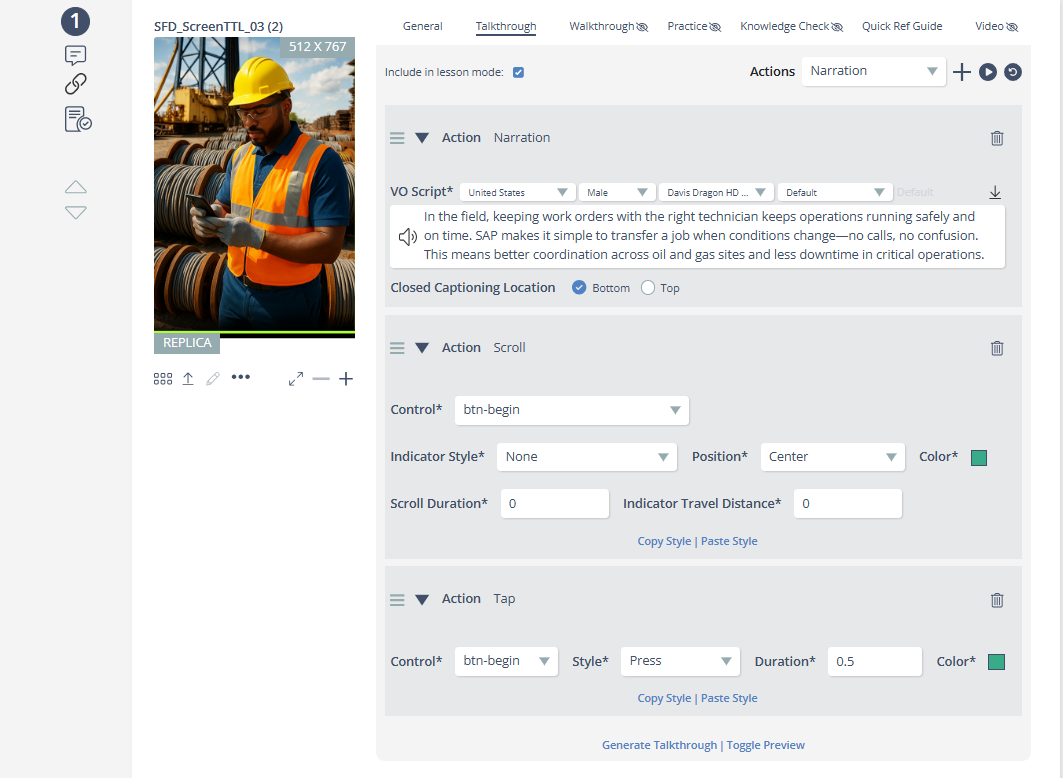
How do you build Talkthrough content in Studio?
You build Talkthrough content in the Talkthrough tab in Skyllful Studio. The tab gives you a live view of your work as you create it.
In the Talkthrough tab you can:
Capability | What it does |
|---|---|
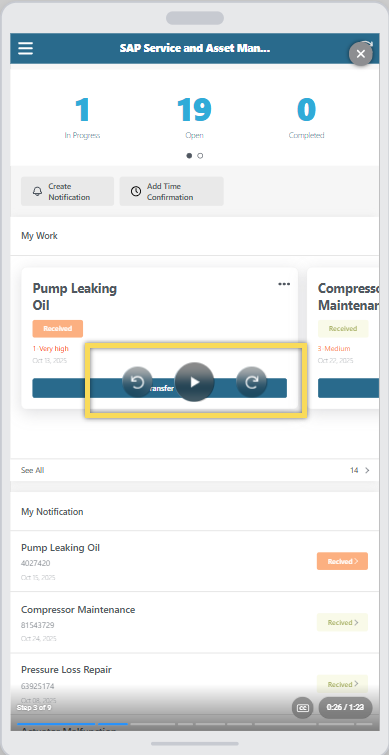
Preview steps live | A live step preview plays your narration with play and pause controls. A visual outline highlights exactly which action is being narrated. |
See updates automatically | The preview updates on its own as you add, edit, reorder, or delete actions. You do not need to refresh. |
Start with consistent defaults | Quick-add defaults for Talkthrough and scroll actions are managed centrally, so new actions start with sensible, consistent settings. |
Add narrated actions | You can add narrations, captions, taps, inputs, and scroll actions to build a complete, guided walkthrough. |
Choose a text-to-speech voice | You can apply a text-to-speech voice, including in bulk, and Talkthrough regenerates the narration audio in the voice you selected. |
The preview controls fade away on their own during playback for a cleaner view, and the preview does not autoplay when you switch tabs.
How does Talkthrough content stay intact across your Lessons?
Talkthrough content travels with your Lessons as you copy, translate, and share them.
Behavior | What it means for you |
|---|---|
Copying a Module or Course | All Talkthrough content carries over intact, including narrations, captions, taps, inputs, scrolls, and step structure. |
Untranslated languages | Lessons with untranslated languages fall back to English narration and text instead of appearing blank. |
Export and import | Captions stay with your Lessons when you export and import them. |
Special punctuation | Caption generation supports special punctuation, such as em-dashes. |
What is Authenticated Preview and how does it protect Lesson previews?
Authenticated Preview is a new feature that lets you require sign-in before anyone can view a Lesson preview. This keeps preview content private to your organization.
When this protection is turned on:
Behavior | Detail |
|---|---|
Sign-in required | Lesson previews require sign-in through your organization's single sign-on before they can be viewed. |
Private preview data | Preview pages and preview data are no longer publicly accessible. |
Automatic preview access | Colleagues who open a shared preview link are granted preview-only access after they sign in. No manual account setup is needed. |
What else improved in Studio?
These fixes make everyday work in Skyllful Studio smoother.
Fix | Result |
|---|---|
Learning program scroll settings | Scroll settings now apply the correct default styling. |
Replica Editor freeze | The eye-dropper tool and Background Fill function no longer cause the browser to freeze in the Replica Editor. |
Preview dropdown | You can now close the preview dropdown while the Update button is active. |
Long learning program names | Long learning program names now display correctly on the learning programs tab of the Home Page. |
Preview comments tray | The preview comments tray now loads more smoothly behind a single loading indicator. |
What improved in the Simulator?
These fixes improve how steps and scrolling behave during preview in the Skyllful Simulator.
Fix | Result |
|---|---|
Skip back | Skipping back a step now resets the scroll position correctly. |
Mobile scroll indicator | The scroll indicator now appears on mobile screen sizes in preview. |
Scroll-only steps | Skipping forward or backward no longer gets the preview stuck on steps that contain only scroll actions. |
Fast-forward | Fast-forward is now disabled in the web Simulator, so trainees complete each step. |
What performance improvements were made?
The User Management page search is now significantly faster for large organizations.
What platform improvements were made?
These updates modernize the foundations of the Skyllful Platform.
Improvement | Benefit |
|---|---|
Backend framework update | All backend services received a framework update for better performance and long-term security support. |
Modern frontend build system | All web frontends moved to a modern build system for faster load times and quicker delivery of future improvements. |
Hardened feature flag infrastructure | Feature flag infrastructure now uses a persistent backing store, keeping the Platform stable even during third-party service outages. |
Related Articles
Welcome to Skyllful Studio: Learn how Skyllful Studio helps you author and manage content.
Skyllful Platform Overview: See how Studio, Simulator, and Skyllful IQ work together as components of the Skyllful Platform.