

✨ Introducing Just-In-Time Training (JITT) Assignments
We're excited to introduce a brand-new assignment type — Just-In-Time Training (JITT) — the first new assignment type added to Skyllful in over two years.
Unlike Campaign or New Hire assignments, where each learner has a single due date, JITT assignments support multiple due dates per learner. This is designed for workflows where the same training needs to be completed repeatedly — not just once.
Think of use cases like:
A field technician who must acknowledge site-specific safety procedures each time they receive a qualifying work order — Monday’s job and Thursday’s job each get their own deadline
A driver flagged for a safety incident who completes remediation training, then needs to retake it months later after another incident
JITT brings Skyllful into compliance-driven, event-triggered training — where completion is tied to real-world moments, not a single calendar date.
🛠️ Creating JITT Assignments in Studio
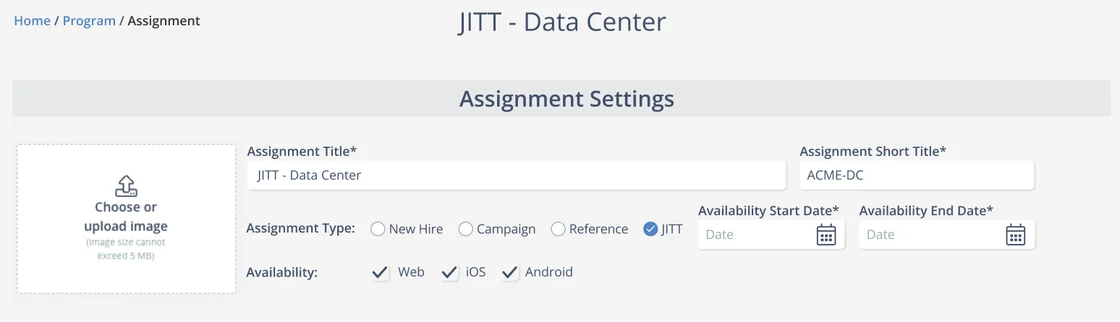
Setting up a JITT assignment works just like creating any other assignment. From the Assignment Settings page, you’ll now see JITT as a fourth assignment type alongside New Hire, Campaign, and Reference.
Once created, the Learners tab is where the key difference becomes clear. Each learner can have multiple due dates — each with a specific date and time — and you can track completion status at the individual deadline level.
Admins can add new due dates, remove them, and see at a glance which deadlines have been met and which are still pending.
📊 JITT in IQ: Compliance at a Glance
IQ now includes a dedicated view for JITT assignments, tailored specifically for compliance-style tracking.
People Tab
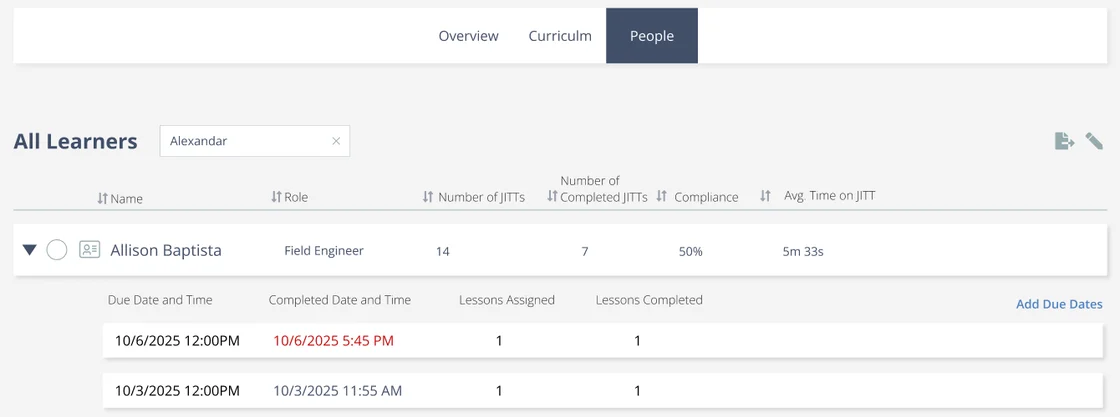
From the People tab, supervisors can see JITT-specific metrics for each learner at a glance:
Number of JITTs assigned
Completed JITTs count
Compliance % — how many deadlines were met on time
Avg. Time on JITT — how long learners typically take
Expanding a learner’s row reveals every individual due date with its completion status, lessons assigned, and lessons completed. And if a supervisor needs to assign a new deadline, they can do it right here — with the Add Due Dates link — without switching back to the Studio admin panel.
Compliance Overview
The JITT dashboard header provides a quick read on overall compliance, showing the assignment name, learner count, date window, and a prominent compliance percentage — making it easy to assess program health at a glance.

📱 Mobile: Time-Sensitive Assignments
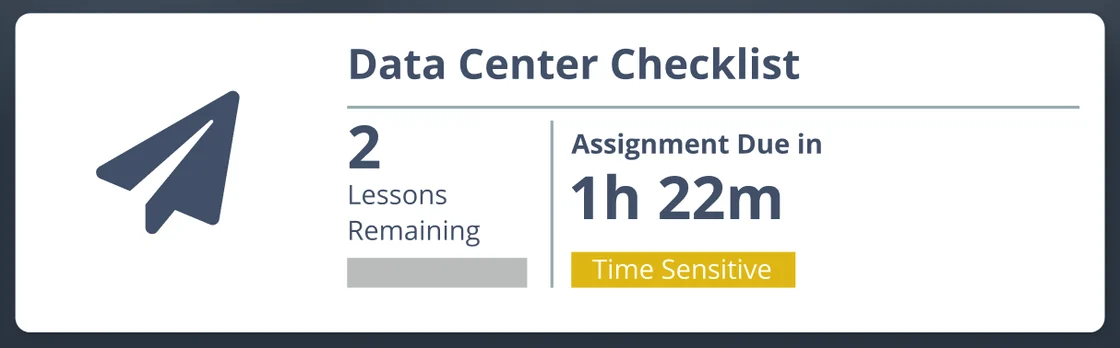
JITT assignments introduce a new dimension to the mobile experience: due times, not just due dates.
Because JITT deadlines are often tied to real-world events — like a work order arrival time — learners now see exactly how much time they have remaining, down to the hour and minute. Assignments approaching their deadline are flagged with a “Time Sensitive” badge so learners know to prioritize them.
📋 Note for Admins: The updated mobile experience requires a new deployment of your iOS and Android applications. Please coordinate with your IT team to schedule the update.
👀 Stay Tuned
This is just the beginning for JITT. In upcoming releases, we’ll make exciting new announcements that will supercharge this new feature.
Please continue bringing your ideas and requests forward so we can turn them into actionable platform improvements that effectively target your needs.